


The Madras Gymkhana Club, established in 1884, is one of South India's oldest sporting institutions. Recently, the Club's website was given a makeover to reflect its heritage. However, accessibility wasn't a first-class concern in the initial build.
I joined the project as a collaborator, and used Claude Code to run a structured accessibility audit and then implement the fixes, working within the existing codebase and contributing through a proper PR workflow.
You can access the live site here.
The Psychology Behind It
At its core, accessibility is a question of who gets to use something and who doesn't. Every missing focus indicator, unlabelled form field, or low-contrast text block is a small barrier and for users who rely on keyboard navigation or screen readers, small barriers compound quickly into an experience that simply doesn't work.
This project was an exercise in finding the places where the design had quietly excluded people, and fixing them.
Running an Accessibility Scan
I began by asking Claude to scan the site and identify the most significant accessibility concerns across the codebase. This surfaced six actionable issues that were tracked by GitHub and worked through one by one.
Issues
Issue #1: Keyboard Nav // Skip Navigation Link
Keyboard users were forced to tab through the full navigation bar on every page before reaching the main content. A (visually) hidden skip link was added, appearing only on focus.

Issue #2: Focus Styles // Visible Focus Indicators
The site had outline: none set globally which made keyboard navigation nearly invisible. This was replaced with a :focus-visible rule that shows a 2px crimson outline only for keyboard users, leaving mouse interactions unchanged.

Issue #3: Contrast // Text-on-Image Contrast
Hero sections and facility panels placed white text directly over photographs. Depending on the image, contrast ratios fell as low as 2:1, well below WCAG AA's 4.5:1 minimum.
The fix was a directional gradient overlay (left-to-right, with the text sitting on the darker side) rather than a uniform darkened box. This preserved the full photograph on the right while bringing text contrast up to standard on the left.
Facility panel labels in the gold accent colour were also adjusted from #C6A75E (6.7:1, AA only) to #CEAF68 (7.4:1, AAA). This was a small shift nearly invisible to the eye but meaningful to the standard. Before and after:

Issue #4: Forms // Form label association
The membership enquiry form had visible labels but they were not programmatically linked to their inputs, i.e. there was no for/id pairing. Screen readers had no way to announce what each field was for. A subject field was also missing entirely from the form, which had been flagged as a separate issue. Both were resolved in the same pass.
Issue #5: Interactions // Button hover states
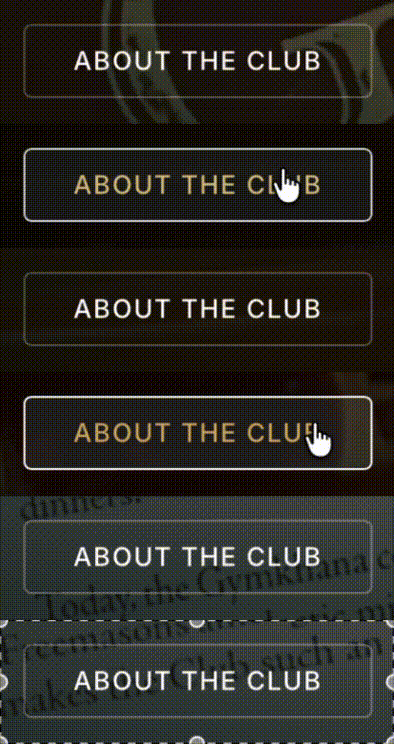
Tertiary and ghost buttons had no meaningful visual change on hover which is a problem for users who rely on visual feedback to confirm that a control is interactive. The tertiary button now shows a crimson border on hover. The ghost button (used on dark image backgrounds) shifts to gold text with a full white border, remaining legible against both light and dark backgrounds.

This is one of the first projects I have worked on using Claude Code, as well as the first time I've run my own accessibility audit on a website.
I have 'vibe-coded' in the past, so I was vaguely familiar with how to talk to the AI to produce a certain output, but was pleasantly surprised at how natural it felt. On ocassion I had to modify my prompt a few times until Claude understood what I was trying to achieve, but I managed to get there eventually.
I was mostly amazed by how using Claude to assist me in this completely changed the efficiency with which I was able to approach it.
Now, the Madras Gymkhana Club Website has a WAVE AIM score of 9.7/10.
Having said that, I'm very cognisant of the fact that this has been a bare-bones accessibility audit, and it certainly is not complete until we determine whether or not differently-abled users can actually get through the site successfully.
However, I found this exercise to be eye-opening in showing me how to begin checking for web accessibility, as well as in discovering the benefits of incorporating tools like Claude into your workflow as a designer.